Gantt chart GitHub repository
By Prairie Loom editorial team Verified against the current GanttProject release on GitHub Releases
What the repo is
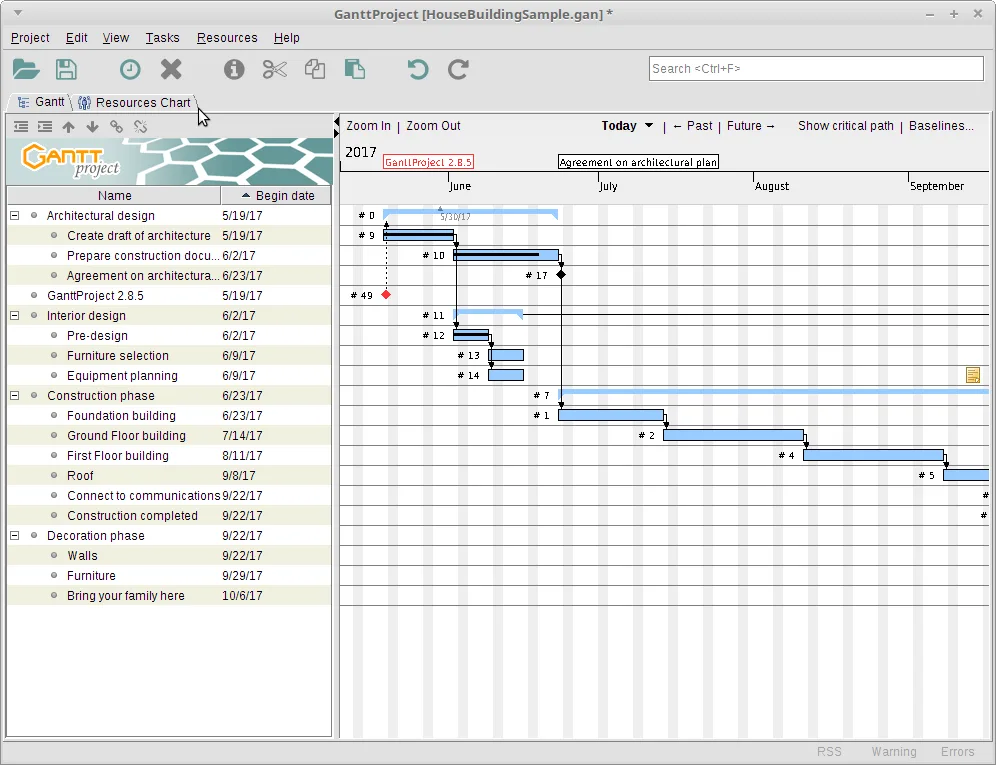
bardsoftware/ganttproject is the official GitHub repository for the GanttProject desktop app. The license file reports GPL-3.0. The README describes task hierarchy, dependencies, milestones, baselines, resource load charts, cost calculation, export, and interoperability features that power an everyday gantt chart.
Stars and release metadata on this site come from the GitHub API at build time. Read them as live figures, not as marketing claims typed into the article.
Issues and discussions on GitHub are upstream channels. This install guide does not replace the project’s own tracker.
License and reuse
GPL-3.0 means you can run, study, share, and modify the software under the license terms. Screenshots used here from Wikimedia Commons carry GPL or CC BY-SA credit lines naming GanttProject.
Do not re-upload the MSI to a random file host and call it official. Point people at GitHub Releases when they need a gantt chart installer.
If you ship an internal fork, say so clearly and keep your update door documented so users know which binary they run.
Tags versus branches
Desktop installers ship on ganttproject-* tags. Branches hold development work and are not the everyday download door for a gantt chart end user.
Monorepo-style modules in the tree cover importers, exporters, and chart components. You do not need to build from source to schedule a project.
Contributors who want to compile can follow the README gradle instructions; everyone else should stay on Releases.
How this guide uses GitHub
site.config points app.repo at bardsoftware/ganttproject, releaseTagPrefix at ganttproject-, and Releases URLs at the official pages. The install panel download buttons resolve through /installed to the picked asset URL.
GhStats on the home page surfaces stars and release timing from gh.json. If fetch-gh fails, rebuild with a token rather than inventing numbers.
Never paste personal access tokens into the repo. Tokens stay in the builder environment only.
Security tab
GitHub’s security tab for the repo is the place for upstream advisories. Link it from trust pages when readers ask whether a gantt chart desktop tool is maintained.
Report vulnerabilities through the project’s stated policy, not through this site’s contact form.
If SmartScreen blocks an MSI, verify the hash or at least the exact file name on the release before you assume malware.
Reading the tree without drowning
You can skim README, LICENSE, and the latest release notes without cloning. That is enough for an install decision on a gantt chart tool.
Deep module names matter when you develop plugins, not when you need next week’s schedule printed for a meeting.
Keep bookmarks to Releases and to the learn pages on ganttproject.biz for human docs.
Keep the job name clear
Keep the write phrase clear when you talk about the job: people typed gantt chart because they need bars on a timeline, not a slide deck sketch. GanttProject is the GPL-3.0 program this guide installs, and the official binaries live on GitHub Releases under ganttproject-* tags. Prefer ganttproject-*.msi on Windows, match silicon or intel DMG files on macOS, or install the Homebrew cask when that is your standard Mac channel. Linux users on Debian-family desktops should take the architecture-independent deb from the same tag and install it with their usual package tool.
One careful install
A careful install habit beats a clever workaround. Download once from bardsoftware/ganttproject, verify the file name, run the installer, and prove a tiny schedule before you import a giant plan. Save a .gan file in a folder you back up. Export a PDF or PNG so stakeholders can read the gantt chart without installing the desktop app. When you update, return to the same Releases page rather than a random mirror that wraps the setup in unrelated offers.
Dependencies first
Dependencies are what make a gantt chart honest. If you only paint bars without links, a slip in one task never moves the work that should wait. Add finish-to-start links on day one, mark milestones for fixed events, and set a baseline before a major reshuffle so you can compare plan versus actual. Resource load charts help after the timeline itself is trustworthy. Cost fields help when money tracks with time. None of those extras replace clear task names and realistic durations.
Release metadata
The install panel resolves official assets through the latest fetched release metadata. Versions in the footer and stamp come from that data at build time, so you should not pin a version number in your internal prose if you can say “current release on GitHub Releases” instead. Winget was not verified for GanttProject on the research day, so Windows stays on the MSI path. Homebrew’s ganttproject cask was verified via formulae.brew.sh for macOS.
When something fails
If something fails, stop and re-check the download-safe steps before you try a second website. SmartScreen and Gatekeeper prompts are normal for first launches of internet-downloaded software. Continue only when the publisher and file name match what you expect from the bardsoftware release. Share the Releases URL with teammates instead of emailing a private copy of the MSI that will go stale.
Ongoing work habits
For ongoing work, treat the schedule like any other engineering tool: one update door, one project folder convention, one person who checks Releases after a major planning cycle. Optional WebDAV or GanttProject Cloud collaboration can wait until offline scheduling is boringly reliable. Importers for MS Project and spreadsheets are power tools—prove a native file first, then migrate, then clean links that did not survive.