- ganttproject-3.3.3316-intel.dmg 138 MB 39k downloads
- ganttproject-3.3.3316-silicon.dmg 133 MB 39k downloads
- ganttproject-3.3.3316.exe 131 MB 22k downloads
- ganttproject-3.3.3316.msi 133 MB 2.7k downloads
- ganttproject_3.3.3316-1_all.deb 93.8 MB 3.6k downloads
Gantt chart: free desktop schedule install
A gantt chart turns tasks, dates, and dependencies into bars on a timeline you can share. GanttProject does that job on your computer: download the current Windows MSI from GitHub Releases (or the macOS and Linux builds), install it, open a project, and draw the schedule without a SaaS seat for everyday offline work.
- Windows:
ganttproject-*.msifrom GitHub Releases (prefer over .exe) - macOS: Homebrew cask
ganttprojector silicon/intel .dmg - Linux:
ganttproject_*_all.debon the same release tag
By Prairie Loom editorial team Verified against the current GanttProject release on GitHub Releases
Install GanttProject 3.3.3316
Windows
GitHub Releases ganttproject-*.msi (no winget package verified for this guide). Prefer the MSI; .exe is the alternate Windows installer on the same tag.
Download the file directly from the official GitHub release:
Download Windows MSI installerAlso on this release: Windows .exe installer
Windows 10 or 11, 64-bit. Prefer ganttproject-*.msi from the latest ganttproject-* tag; use the .exe only when MSI is unavailable.
macOS
Paste into Terminal:
brew install --cask ganttprojectPackage: Homebrew cask maintained by the Homebrew community (formulae.brew.sh/cask/ganttproject).
Or download the file directly from the official GitHub release:
Download macOS Apple Silicon .dmgAlso on this release: macOS Intel .dmg
macOS with Apple Silicon or Intel. Match the .dmg to your chip, or use the Homebrew cask.
Linux
Paste into your terminal:
sudo apt install ./ganttproject_*_all.debPackage: Debian package attached to GitHub Releases (architecture-independent .deb).
Or download the file directly from the official GitHub release:
Download Debian / Ubuntu .debA Debian-based desktop (Ubuntu, Debian, Mint) or any distro that can install a .deb.
Every file comes from bardsoftware/ganttproject ganttproject-3.3.3316 on GitHub, the project's own release, unmodified.
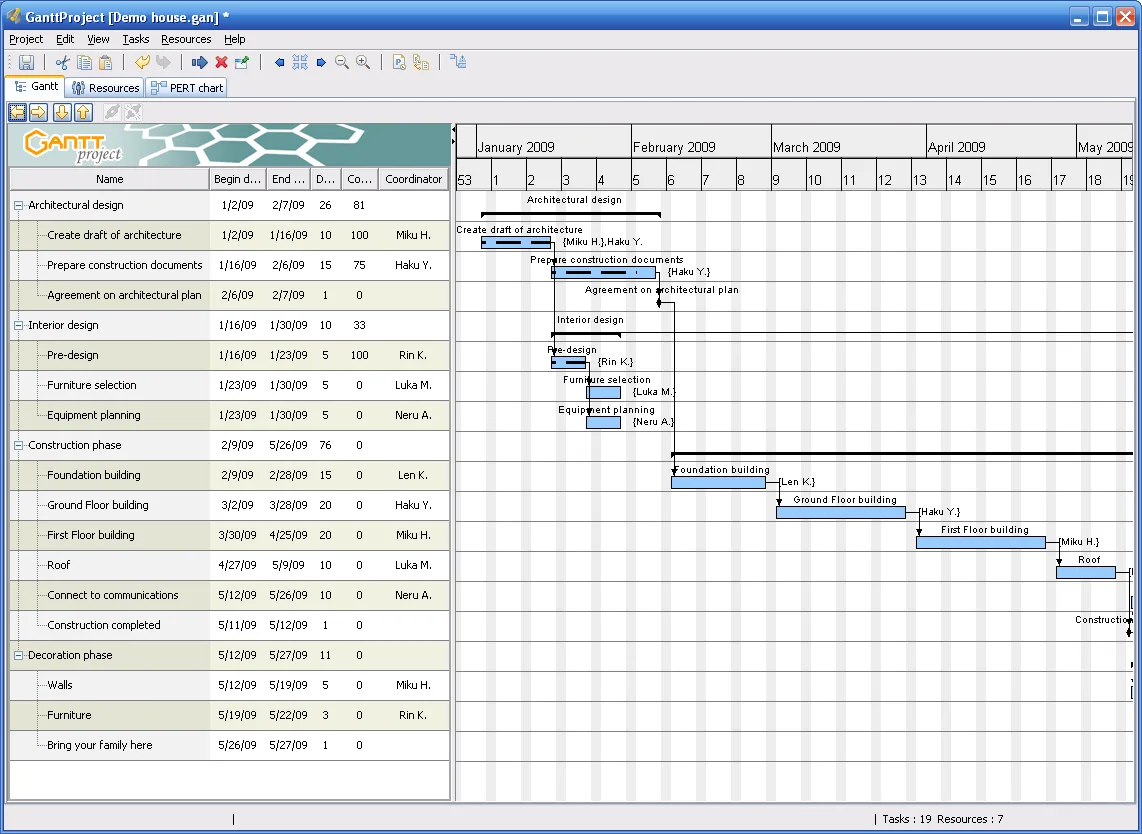
People searching for a free desktop gantt chart usually want task bars, dependencies, and a file they control. Keep this gantt chart install on GitHub Releases for bardsoftware/ganttproject, prove one small schedule, then explore baselines, resources, and export only after that path works.
A gantt chart here means the classic project timeline: rows for tasks, columns for calendar time, bars for duration, arrows for links, and diamonds for milestones. GanttProject is the GPL-3.0 desktop program this guide maps. Source and downloads live on bardsoftware/ganttproject. The release door is GitHub Releases. Safe download path: download-safe path. Repo layout: GitHub overview. Which file: releases.
What a gantt chart job needs
A gantt chart job on a personal or team PC needs software that shows work across time, not only a bullet list. You enter tasks, nest them, set start and finish, link predecessors, and watch the bars move when dates change. GanttProject keeps that work in a local project file. You open the table, edit durations, draw links on the gantt chart, and export PDF, HTML, or PNG when someone else only needs a picture.
The same app also offers a PERT chart option, a resource load chart, task cost calculation, and importers that talk to MS Project and spreadsheet files. Collaboration over WebDAV or GanttProject Cloud is optional; offline scheduling does not require an account. First project notes: after you download. Import notes: import a project plan.
Windows 10 or 11 is the everyday baseline for the MSI. macOS users match silicon or intel DMG assets, or install the Homebrew cask. Linux users on Debian-family desktops take the architecture-independent .deb. Machine chooser: for this computer.
How GanttProject lays out the work
GanttProject opens with a task table beside the gantt chart timeline. You add rows, indent for hierarchy, and stretch bars to change duration. Dependency links connect finish to start by default so a slip in one task pushes successors. Milestones mark fixed events. Baselines let you compare the plan you saved earlier with the plan you have now.
Upstream documents export to PDF, HTML, and PNG, plus interoperability with MS Project and spreadsheet apps. Resource load charts show who is overbooked. Cost fields roll up when you track money with the schedule. Prefer the current MSI from GitHub Releases for Windows. Prefer the current release tag without hardcoding a version number in your runbook.
Why this desktop path
Four facts decide this gantt chart desktop job, each with a source you can open.
GPL-3.0 on GitHub
The project LICENSE on GitHub reports GNU GPL v3. Free open-source downloads cover the GitHub desktop assets for this gantt chart. Safety notes: is it safe.
GitHub Releases MSI first
These pages map ganttproject-*.msi as the Windows file of record, with .exe as the alternate on the same tag. macOS and Linux assets sit beside them. Releases map: releases.
Real project features
README lists hierarchy, dependencies, milestones, baselines, resource load, cost calculation, and export. That is the everyday gantt chart toolkit without a mandatory cloud seat.
Local files, optional cloud
- Save .gan projects on your disk.
- Prefer GitHub Releases over random mirrors.
- A wrapper that ranks for gantt chart is still the wrong binary.
Install by operating system
On the PC that needs a gantt chart, open bardsoftware/ganttproject releases, take the current ganttproject-*.msi for Windows, or the matching macOS DMG / Linux deb, and install it. Confirm the asset name on the release list before you execute. Longer Windows page: install on Windows. Machine chooser: for this computer.
| OS | File or command | Package source | Guide |
|---|---|---|---|
| Windows | ganttproject-*.msi | GitHub Releases | Windows install |
| Windows (alt) | ganttproject-*.exe | Same release tag | releases |
| macOS | brew install --cask ganttproject | Homebrew cask | macOS install |
| Linux | ganttproject_*_all.deb | GitHub Releases | Linux install |
This guide maps the Windows MSI path first because Manager locks prefer that asset for the head term. Homebrew is verified for macOS. No winget id was found in microsoft/winget-pkgs on the research day, so Windows stays on GitHub Releases.
Eight steps to first schedule
Machine path: for this computer. After the download lands: first hour after install. A saved .gan with three linked tasks is a better test than stacking three different downloads from three mirrors.
- Open GitHub Releases for bardsoftware/ganttproject Open the official Releases page and confirm you are on a ganttproject-* tag, not a random fork.
- Download the Windows MSI first Prefer ganttproject-*.msi for Windows. Use the .exe only when MSI is missing on that tag.
- Run the installer and finish UAC Complete the classic MSI. On macOS take the matching .dmg or brew install --cask ganttproject; on Linux install the .deb.
- Launch GanttProject once Confirm the task table and gantt chart pane open without an account wall.
- Add three tasks and one dependency Create a tiny schedule, link two bars, and save a .gan file so you know the path works.
- Export one PDF or PNG Use File → Export once so stakeholders can read the gantt chart without installing the app.
- Keep one update door Return to the same GitHub Releases page for the next MSI, DMG, or deb. Skip Softonic-style wrappers.
- Optional import check If you already have an MS Project or spreadsheet plan, try one import after the local schedule works.
First hour after install
Start this gantt chart with a tiny project you already understand: a home remodel, a release checklist, or a course plan. Add tasks, set durations, link two bars, and save. Then export one PDF so a stakeholder can read the gantt chart without installing anything.
If the app fails to start, re-check that SmartScreen or Gatekeeper allowed the file from GitHub Releases. Do not download a second copy from a random mirror to fix a blocked first run. First run: first run. Safety: safe download.
Resource load and baselines can wait until the simple timeline works. Import from another tool: import a project plan. Head-to-head notes: vs Microsoft Project.
How to choose a gantt chart tool
A careful buyer checks five things before they trust a gantt chart with real dates. First, where the file lives: local disk, vendor cloud, or both. Second, whether dependencies and hierarchy are real or only painted bars in a slide. Third, export quality for people who will never open the app. Fourth, license and price over a year. Fifth, whether the update door is the vendor release page or a sketchy mirror.
GanttProject scores well when you want a free GPL-3.0 desktop gantt chart with importers and exports. Paid SaaS wins when your company already standardizes on browser seats and audit trails in a vendor cloud. Spreadsheet bars win for throwaway sketches and lose when predecessors matter. Pick the smallest tool that survives a date slip without rewriting the plan by hand.
Compared with other schedulers
| Option | Price | Open source | Platforms | Notes |
|---|---|---|---|---|
| GanttProject | Free desktop | GPL-3.0 | Win/mac/Linux | Local gantt chart, optional Cloud |
| Microsoft Project | Commercial | No | Windows / web plans | Incumbent enterprise PM |
| ProjectLibre | Free | Yes | Desktop | Another desktop MS Project-style app |
| Spreadsheet bars | Free | Varies | Desktop/web | Fast sketch, weak dependencies |
| Browser PM suites | Usually paid | Usually no | Web | Seats and live collab |
Longer comparison: vs Microsoft Project. Spreadsheet sketches win when you cannot install software. GanttProject wins on offline PCs and when you want a classic gantt chart file under GPL-3.0. Enterprise suites win when purchasing already locked the stack.
Free desktop vs paid cloud
The GanttProject desktop app is free under GPL-3.0. You can build a full gantt chart, assign resources, and export without paying. GanttProject Cloud is a separate commercial collaboration option mentioned upstream; skip it until a team truly needs that service. Paid Microsoft Project and SaaS gantt products add portfolio views, enforced templates, and vendor-hosted sharing. Buy those when your org already requires them, not because a search ad said “pro.”
For a student, freelancers, or a small shop, the free desktop gantt chart is enough: one MSI, one .gan file, one PDF export. For a PMO with hundreds of linked projects, evaluate the incumbent suite against migration cost before you switch tools for branding reasons alone.
Mistakes that undo a gantt chart
Five concrete mistakes show up again and again. First, downloading a renamed setup from a review portal instead of GitHub Releases. Fix: match the asset name ganttproject-*.msi on bardsoftware releases. Second, painting bars with no dependencies so a slip never moves successors. Fix: link predecessors on day one. Third, skipping milestones so executives cannot see fixed events. Fix: mark releases and deadlines as milestones. Fourth, never exporting, so reviewers edit screenshots forever. Fix: export PDF or PNG after each planning meeting. Fifth, keeping three installs from three mirrors. Fix: one update door forever.
A sixth habit helps: save baselines before a major reshuffle so the gantt chart can show plan versus actual. Without a baseline, arguments about “what we promised” become memory contests.
Guides index
Longer gantt chart how-tos live under guides: Windows, macOS, and Linux install, safety, first run, MSI notes, import, Microsoft Project comparison, troubleshooting, and update/uninstall. Cluster pages cover releases, GitHub, download safe, and for this computer.
Repeatable gantt chart habits
A repeatable gantt chart habit looks like this: one installer from GitHub Releases, one tiny linked schedule after install, one export for stakeholders, and one update door forever. That rhythm keeps GanttProject useful on a shared PC without drifting into adware mirrors.
Teams that replan weekly should treat the gantt chart like any other signed tool. Document whether the PC used MSI, DMG, or deb. Document where .gan files live. Document who owns the next Releases check. Those notes prevent “which binary is this” arguments after a reimage.
When a contractor asks for dates, the gantt chart export is clearer than a chat thread. When a class project needs ownership, resources on the chart beat a vague spreadsheet. When a launch needs a critical path, dependencies matter more than color themes. Keep the job name clear so searchers who typed gantt chart land on scheduling first.
Everyday limits
A desktop gantt chart cannot fix unclear scope. Phone screenshots of the timeline still need readable fonts. Dense programs need honest durations, not wishful bars. Shared PCs should store .gan files in a known folder. Prefer one update door for installs: GitHub Releases for MSI/DMG/deb, or Homebrew when that is how you installed on macOS.
Borrowed or locked-down lab PCs may block unknown MSI files. Stop rather than force a wrapper installer from a search ad. Use a machine you control when you need a clean gantt chart path. A second proof after every reimage keeps the Start menu honest.
Chart settings that matter
A gantt chart is only useful when task names are clear and links are real. GanttProject lets you nest tasks, set lags, and compare against a baseline so a slip is visible. Start with a short list of deliverables, then add detail. Zoom the timeline so a month fits the screen before you present.
Color coding helps humans scan, but contrast still matters on projectors. Prove one plain gantt chart print before you style a portfolio view. Resource leveling is a power move, not a first-hour task. Prove one linked schedule, then open the resource chart, then consider Cloud collaboration.
After the first export
After you trust the timeline, export helps you inspect a printed gantt chart before you hand it to a client. PDF and PNG are the everyday doors. Use them to verify dates match what you typed. HTML export helps when someone wants a browser view without the desktop app.
Import from MS Project or spreadsheets is a power tool, not a first-hour task. Prove one local schedule, then import a copy of an old plan, then compare. Guides: first run, troubleshooting.
How do I install a gantt chart on Windows?
Download the current ganttproject-*.msi from GitHub Releases for bardsoftware/ganttproject and run it. Prefer the MSI over the .exe on the same tag. Guide: install on Windows. No winget package was verified for this guide, so stay on the official release assets.
Where should I download a gantt chart app?
Prefer GitHub Releases for bardsoftware/ganttproject when you need the MSI, DMG, or deb assets, or use the Homebrew cask on macOS after you trust that formula. Skip Softonic-style wrappers that rename the setup. Details: download safe.
Is this gantt chart software free?
GanttProject desktop is free under GPL-3.0. GitHub Releases assets named above have no paywall for local scheduling. GanttProject Cloud is a separate optional service. There is no paid unlock required for basic offline gantt chart work on your own files.
Can I move a plan into this gantt chart?
Upstream documents interoperability with MS Project and spreadsheet apps, plus WebDAV collaboration. Start with a local .gan proof, then try one import from your old tool. Guide: import a project plan. Comparison context: vs Microsoft Project.
Does the desktop gantt chart work offline?
Yes. After you install from GitHub Releases or Homebrew, project files save on your disk and the timeline edits do not require a browser session. Cloud collaboration stays optional. Offline habits: first run and first hour.
Official releases
All releases on GitHub- GitHub stars
- 1,099
- Downloads, last 3 releases
- 199k
- Latest version
- 3.3.3316
3.2.3200
ganttproject-3.2.3200
- ganttproject-3.2.3230.dmg 115 MB 35k downloads
- ganttproject-3.2.3230.exe 111 MB 25k downloads
- ganttproject_3.2.3230-1_all.deb 50.0 MB 499 downloads
3.1.3100
ganttproject-3.1.3100
- ganttproject-3.1.3100.dmg 114 MB 3.3k downloads
- ganttproject-3.1.3100.exe 109 MB 28k downloads
- ganttproject_3.1.3102-1_all.deb 49.2 MB 174 downloads
Counts come from the GitHub API at build time and only cover the ganttproject-* tags shown here. Package managers (winget, Homebrew, Snap, Flathub) and app stores are not included.