Gantt chart releases and assets
By Prairie Loom editorial team Verified against the current GanttProject release on GitHub Releases
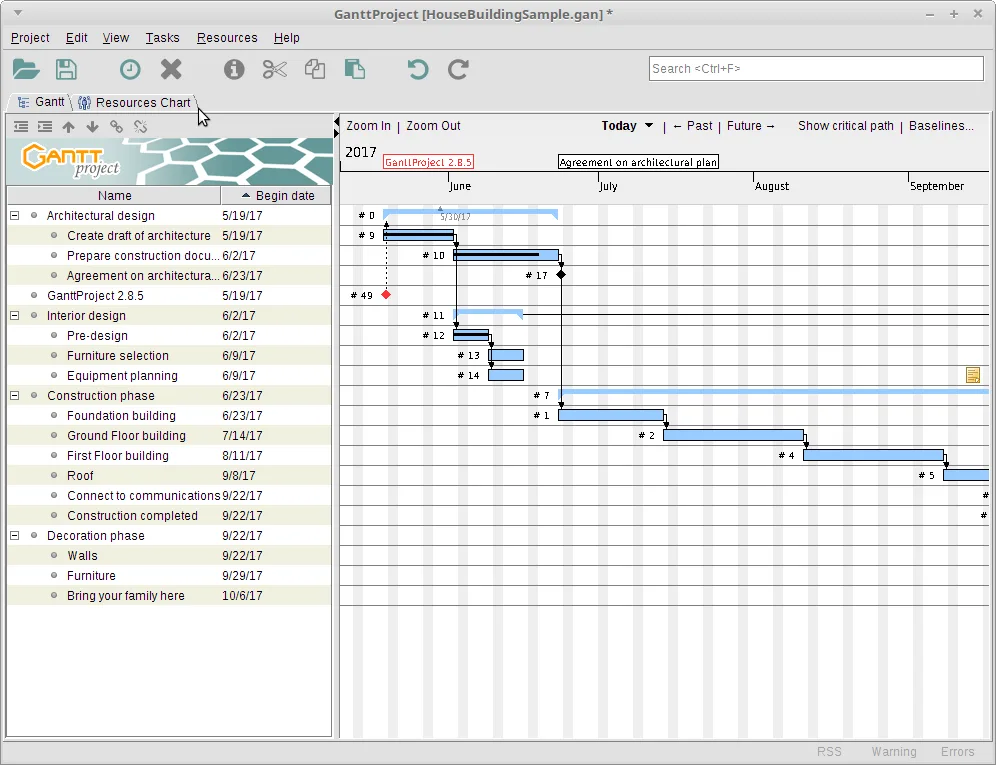
Which tag to open
Open the bardsoftware/ganttproject Releases page and stay on tags that start with ganttproject-. Those tags ship the desktop installers for a local gantt chart. Ignore unrelated forks that only mirror source zip files without the MSI.
Each modern tag typically attaches Windows MSI and EXE, macOS silicon and intel DMG files, a Linux deb, and a zip archive. This guide maps MSI first for Windows because that is the Manager lock for the head term gantt chart.
Confirm the published date on the release, then match the file name before you run anything. Prefer assets whose names begin with ganttproject- and end in .msi, .dmg, or .deb.
Install GanttProject 3.3.3316
Windows
GitHub Releases ganttproject-*.msi (no winget package verified for this guide). Prefer the MSI; .exe is the alternate Windows installer on the same tag.
Download the file directly from the official GitHub release:
Download Windows MSI installerAlso on this release: Windows .exe installer
Windows 10 or 11, 64-bit. Prefer ganttproject-*.msi from the latest ganttproject-* tag; use the .exe only when MSI is unavailable.
macOS
Paste into Terminal:
brew install --cask ganttprojectPackage: Homebrew cask maintained by the Homebrew community (formulae.brew.sh/cask/ganttproject).
Or download the file directly from the official GitHub release:
Download macOS Apple Silicon .dmgAlso on this release: macOS Intel .dmg
macOS with Apple Silicon or Intel. Match the .dmg to your chip, or use the Homebrew cask.
Linux
Paste into your terminal:
sudo apt install ./ganttproject_*_all.debPackage: Debian package attached to GitHub Releases (architecture-independent .deb).
Or download the file directly from the official GitHub release:
Download Debian / Ubuntu .debA Debian-based desktop (Ubuntu, Debian, Mint) or any distro that can install a .deb.
Windows MSI and EXE
The primary Windows asset is ganttproject-*.msi. Run that installer when you want a classic desktop gantt chart on Windows 10 or 11. The .exe on the same tag is the alternate Windows installer if MSI is missing or blocked by a local policy you cannot change.
Do not invent a winget command for this guide. A search of microsoft/winget-pkgs returned no ganttproject package on the research day. Keep Windows installs on GitHub Releases until a package id is verified.
After install, launch once and save a tiny .gan file so you know the gantt chart path works before you import a large plan.
macOS and Linux assets
macOS users should match Apple Silicon versus Intel DMG names, or run brew install --cask ganttproject after trusting the Homebrew cask. Linux users on Debian-family desktops install the architecture-independent deb from the same tag.
Zip archives are ignored for direct-download picks on this site because they are easy to confuse with source trees. Prefer the platform installer that matches your OS.
When you update, return to the same Releases page rather than a bookmark to an old asset URL. Tags move; file names include the version so you can see what changed.
How release assets are matched
fetch-gh reads the latest ganttproject-* tag and matches assetMatch rules in site config. Windows picks the MSI, macOS prefers the silicon DMG with intel as an alternate, and Linux picks the deb. Zip and checksum-like names are ignored.
If a pick looks empty after a new upstream layout, fix the regex against real asset names and re-fetch. Keep downloads on GitHub Releases rather than mirroring binaries here.
Release feed readers can use /releases.xml for change notices, then still download from GitHub.
Signing and SmartScreen
Windows may show SmartScreen on first run of a newly downloaded MSI. Verify the file name matches the bardsoftware release asset before you continue. If the publisher looks wrong or the name is a generic setup.exe, stop.
macOS Gatekeeper similarly wants a clean DMG from the official tag. Homebrew cask installs follow Homebrew’s own quarantine rules.
A gantt chart mirror that adds a toolbar offer is not a security feature. Stay on GitHub Releases or Homebrew.
FAQ-style checks
Ask whether the tag starts with ganttproject-. Ask whether the MSI name matches ganttproject-*.msi. Ask whether you needed a third-party wrapper. If any answer is no, restart from the official Releases page.
Keep a short internal note of which asset you installed so the next update compares like for like. That habit matters more than memorizing a version string in prose.
When a teammate needs the same gantt chart tool, send them the Releases URL plus the asset pattern, not a personal OneDrive copy of the MSI.
Keep the job name clear
Keep the write phrase clear when you talk about the job: people typed gantt chart because they need bars on a timeline, not a slide deck sketch. GanttProject is the GPL-3.0 program this guide installs, and the official binaries live on GitHub Releases under ganttproject-* tags. Prefer ganttproject-*.msi on Windows, match silicon or intel DMG files on macOS, or install the Homebrew cask when that is your standard Mac channel. Linux users on Debian-family desktops should take the architecture-independent deb from the same tag and install it with their usual package tool.
One careful install
A careful install habit beats a clever workaround. Download once from bardsoftware/ganttproject, verify the file name, run the installer, and prove a tiny schedule before you import a giant plan. Save a .gan file in a folder you back up. Export a PDF or PNG so stakeholders can read the gantt chart without installing the desktop app. When you update, return to the same Releases page rather than a random mirror that wraps the setup in unrelated offers.
Dependencies first
Dependencies are what make a gantt chart honest. If you only paint bars without links, a slip in one task never moves the work that should wait. Add finish-to-start links on day one, mark milestones for fixed events, and set a baseline before a major reshuffle so you can compare plan versus actual. Resource load charts help after the timeline itself is trustworthy. Cost fields help when money tracks with time. None of those extras replace clear task names and realistic durations.
Release metadata
The install panel resolves official assets through the latest fetched release metadata. Versions in the footer and stamp come from that data at build time, so you should not pin a version number in your internal prose if you can say “current release on GitHub Releases” instead. Winget was not verified for GanttProject on the research day, so Windows stays on the MSI path. Homebrew’s ganttproject cask was verified via formulae.brew.sh for macOS.
When something fails
If something fails, stop and re-check the download-safe steps before you try a second website. SmartScreen and Gatekeeper prompts are normal for first launches of internet-downloaded software. Continue only when the publisher and file name match what you expect from the bardsoftware release. Share the Releases URL with teammates instead of emailing a private copy of the MSI that will go stale.
Ongoing work habits
For ongoing work, treat the schedule like any other engineering tool: one update door, one project folder convention, one person who checks Releases after a major planning cycle. Optional WebDAV or GanttProject Cloud collaboration can wait until offline scheduling is boringly reliable. Importers for MS Project and spreadsheets are power tools—prove a native file first, then migrate, then clean links that did not survive.